
When I first turned on voice mode in ChatGPT, I wasn’t expecting it to feel all that different from shouting “what’s the weather” into a plastic cylinder. I’ve used Alexa.
I’ve used Google Assistant. I’ve asked them to set timers, read headlines, play jazz, and occasionally settle disputes about whether guacamole counts as a side or a dip. They’ve always been useful in the same way a vending machine is useful. You ask for a thing, and it responds.
ChatGPT voice mode is another experience entirely. It’s not just better as a voice assistant, it's a different kind of tool, even if it arguably should have the same name.
Alexa feels like pressing a button with your voice, but ChatGPT’s voice mode feels much more like talking to another human, or at least a computer with a broader vocabulary than its predecessors. And thanks to the surprisingly well-crafted custom voices, there's less of a grating, robotic aspect to the conversation.
The voice could even mimic thoughtfulness to an extent. It sounded like it had been thinking for a second before speaking, which of course it hadn’t, but the illusion was good enough to make me pause in turn.
Voice engagement
Most of us have been trained by years of voice assistant use to keep our expectations low. We know what those tools are good for: timers, weather updates, basic math, and playing music.
They’re tools in the most literal sense — function over conversation. You don’t talk to Alexa. You talk to her, and she usually, but not always understands you
But ChatGPT’s voice mode felt different immediately. Once I started using it regularly, I noticed I wasn’t commanding ChatGPT as much as thinking aloud and having it carry out my requests, completing the steps from having a goal to a real plan.
Organizing my freezer and tracking thank you cards aren't just abstract dreams. Not because it had feelings, of course, but a voice that fit the mood of brisk productivity certainly didn't hurt.
Mobile ChatGPT chat
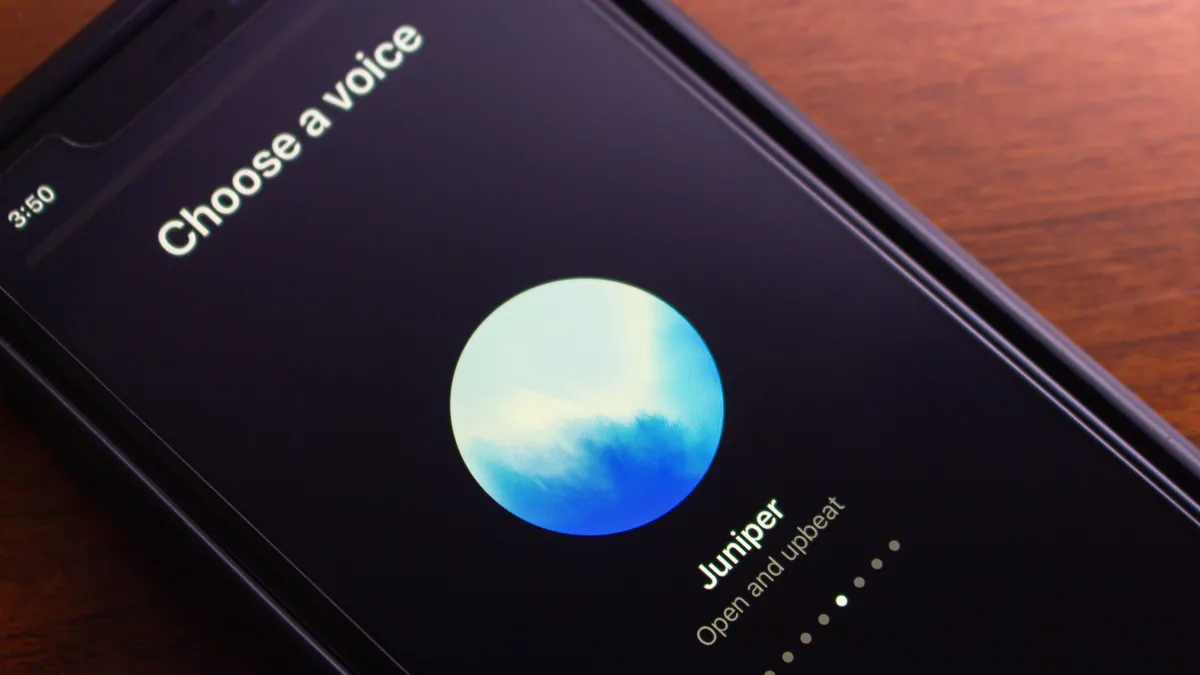
That's why I recommend going to your mobile ChatGPT app, turning on voice mode, and picking a voice that resonates with what you're using it for. I’ve written for years about the value of tone in communication. ChatGPT voice mode understands this intrinsically.
The voice you choose frames the interaction before a single word is spoken. Breeze is fast-talking and energetic, Ember has warm confidence, and Whisper is good for more relaxing, evening conversations or organizing bookshelves.
And because those voices are persistent and real-time, the dialogue flows in a way that text rarely can. There's no keyboard lag, no awkward rewording. You say what you mean, or close to it, and the model meets you there.
This changed my day-to-day usage in ways I didn’t expect. I started brainstorming aloud while pacing. I narrated plans for the weekend while folding laundry and planned recipes while shopping in a kind of frictionless dialogue, often unusual with technology.
Voice mode didn’t replace my text-based use. I still use ChatGPT's web interface for other things. But for more conversational or casual tasks, especially when not at my computer, the voice mode is my preference.
If you haven’t tried it, here’s how to start: download the ChatGPT mobile app, tap the headphone icon, and pick a voice. Start with something like, “I’m trying to figure out what to cook tonight,” or “I’ve got three goals this month, and I need help planning them.” Then just listen.

Try a perspective flip
ChatGPT always tries to help directly. It does not naturally consider alternative vantage points unless you ask for them. Changing the narrator or point of view in the prompt opens up new ways for the AI to consider answers, whether it's through the eyes of an inanimate object, a pet, or simply from a long way away.
ChatGPT responds by reorganizing information around the new narrator rather than rewriting the same answer with different adjectives. The effect is often surprising because it reveals angles you would not have considered on your own.
For example, imagine you are deciding whether to buy a new pair of running shoes. If you ask directly, the model will give you competent, but not very inspiring, buying advice. If you flip the perspective and tell the model to answer as if it were your future self who has already run hundreds of miles in the shoes, the advice becomes more narrative and reflective.
It might describe how the new shoes changed your morning routine, or how they helped you survive a muddy trail run and made you feel lighter on days when you were tired.
That kind of advice can turn a simple shopping question into a small personal story that captures the feeling behind your decision. The model’s baseline tone is practical, but a perspective shift convinces it to behave like a storyteller instead of a rulebook.
Creativity switches
Once you start to see ChatGPT not as a single personality but as a flexible system that responds to mood cues, you realize how much room there is to personalize it. Most people don’t explore that space.
They assume that because ChatGPT’s output sounds smart, it must know the best version of what you want. But often it’s just giving you the most average version of what everyone else has asked for.
These creativity switches let you reclaim the weirdness. They turn ChatGPT into more of a scene partner than a fact-delivery tube. You can still ask for recipes, emails, summaries, and errands.
But when you flip the right switch, the model starts to surprise you. It becomes a little more surprising in its answers, and that might make it more useful, if a little more chaotic, than its baseline approach.
Follow TechRadar on Google News and add us as a preferred source to get our expert news, reviews, and opinion in your feeds. Make sure to click the Follow button!
And of course you can also follow TechRadar on TikTok for news, reviews, unboxings in video form, and get regular updates from us on WhatsApp too.

You must confirm your public display name before commenting
Please logout and then login again, you will then be prompted to enter your display name.